Thursday, January 7, 2010

"Open With" Command Missing from the Context Menu

When you double-click an unknown file type, an unexpected default
action may occur.

When you right-click an unknown file type, the Open With command may
be missing from the context menu that appears.

Use Registry Editor to examine the file association key for unknown
file types:

HKEY_CLASSES_ROOT\Unknown\shell\openas\command

The "default" value for this key should read:

C:\%windir%\rundll32.exe shell32.dll,OpenAs_RunDLL %1

Tuesday, January 5, 2010

How to Enable Windows 7 GodMode


Here’s a neat Windows 7 trick that’s been doing the rounds on the Internet. It enables “GodMode,” a term devised by the Microsoft development team, which provides a single place to access all Windows settings without needing to browse options and folders in the Control Panel.
To use it:
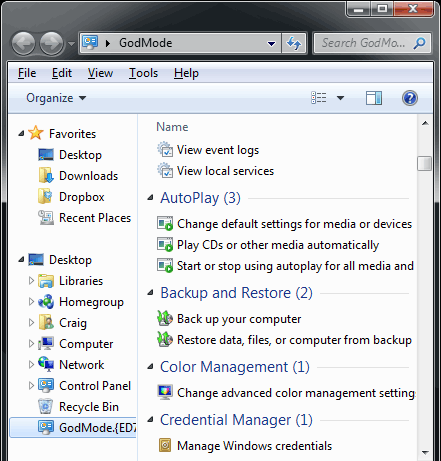
    GodMode window
  1. Create a new folder.
  2. Rename the folder to GodMode.{ED7BA470-8E54-465E-825C-99712043E01C}
    (note that you can change the “GodMode” text, but the following period and code number are essential).
  3. The folder icon will change — double click it to show the GodMode window:
See the attachments:


The window shows nearly 50 sections with quick links to configuration options. Strictly speaking, it’s not a God Mode since all the options are available elsewhere. It’s more akin to an “all tasks” list — but you may find it easier than stumbling through Windows numerous screens and panels.

Advanced MS-Office Repair Utility


A useful & powerful Microsoft Office data recovery suite

Advanced Office Repair is a useful and powerful Microsoft Office data recovery suite. It includes recovery tools for corrupt or damaged MS Access databases, MS Excel worksheets, MS Word documents, MS Outlook data files, and MS Outlook Express dbx and mbx files.


Using Advanced Office Repair to Repair Damaged Microsoft Office Files

When your Access databases, Excel worksheets, Word documents, Outlook data files, or Outlook Express data files are damaged or corrupt due to various reasons and you cannot open them normally, you can use Advanced Office Repair to scan these files and recover the data from them as much as possible.


How To repair


Step 1 Start Advanced Office Repair. The main window looks like this:

Advanced Office Repair Main Window
Step 2: If you want to repair Access databases, please click "Advanced Access Repair" button, and use Advanced Access Repair to repair your databases.

Advanced Access Repair
Step 3: If you want to repair Excel worksheets, please click "Advanced Excel Repair" button, and use Advanced Excel Repair to repair your worksheets.

Advanced Excel Repair
Step 4: If you want to repair Word documents, please click "Advanced Word Repair" button, and use Advanced Word Repair to repair your documents.

Advanced Word Repair
Step 5: If you want to repair Outlook data files, please click "Advanced Outlook Repair" button, and use Advanced Outlook Repair to repair your Outlook PST files.

Advanced Outlook Repair
Step 6: If you want to repair Outlook Express dbx or mbx files, please click "Advanced Outlook Express Repair" button, and use Advanced Outlook Express Repair to repair your dbx or mbx files.

Advanced Outlook Express Repair


Download link:http://www.mediafire.com/?2junyzykhjq

Advanced Outlook Repair Tool


 Advanced Outlook Repair is a powerful Microsoft Outlook recovery tool. It uses advanced technologies to scan the corrupt Outlook personal folders (.pst) files and recover your mail messages, folders, posts, appointments, meeting requests, contacts, distribution lists, tasks, task requests, journals, notes, etc. in them as much as possible, so to minimize the loss in file corruption.

When you use Microsoft Outlook to open a corrupt personal folders (PST) file, you will see various error messages, which may be a bit confusing to you. Therefore, here we will try to list all possible errors, sorted according to their occurring frequency. For each error, we will describe its symptom, explain its precise reason and give a sample file as well as the file fixed by our Outlook recovery tool Advanced Outlook Repair, so that you can understand them better. Below we will use 'filename.pst' to express your corrupt Outlook PST file name.

  • The file xxxx.pst is not a personal folders file.
  • Errors have been detected in the file xxxx.pst. Quit Outlook and all mail-enabled applications, and then use the Inbox repair tool(Scanpst.exe) to diagnose and repair errors in the file. For more information about the Inbox repair tool, see Help.
  • Microsoft Outlook has encountered a problem and needs to close. We are sorry for the inconvenience.
  • The file xxxx.pst could not be found.
  • Unable to display the folder. The file xxxx.pst could not be accessed.
  • xxxx.pst can not be accessed - 0x80040116.
  • File xxxx.pst could not be accessed. Data error. Cyclic redundancy check.

Moreover, when using Microsoft Outlook, you may also encounter the following problems frequently, which can be solved by Advanced Outlook Repair easily.

  • Oversized PST file problem (the PST file size reaches or exceeds the 2GB limit).
  • Forget or lose the password or login information for the PST file.
  • Outlook emails and other items are deleted by mistake.

Main Features in Advanced Outlook Repair v2.1


Arrow
Support Outlook 97, 98, 2000, 2002, 2003 and 2007.

Arrow
Support to recover mail messages, folders, posts, appointments, meeting requests, contacts, distribution lists, tasks, task requests, journals and notes in PST files. All properties, such as subject, message body, to, from, cc, bcc, date, etc., are recovered.

Arrow
Support to recover mail messages in plain text, RTF and HTML format.

Arrow
Support to recover attachments, including the documents and images attached to messages and embedded in HTML bodies.

Arrow
Support to recover embedded objects, such as Excel Worksheets, Word documents, etc.

Arrow
Support to recover deleted Outlook items, including mail messages, folders, posts, appointments, meeting requests, contacts, distribution lists, tasks, task requests, journals and notes.

Arrow
Support to recover oversized 2GB PST files.

Arrow
Support to recover PST files as large as 16777216 TB (I.e. 17179869184 GB).

Arrow
Support to split the output PST file into several small files.

Arrow
Support to recover password protected PST files, both compressible encryption and high encryption(or best encryption) are supported. The PST files can be recovered even if you don't have the password.

Arrow
Support to convert PST file from Outlook 97-2002 format into Outlook 2003/2007 format, and vice versa.

Arrow
Support to generate fixed PST file in Outlook 97-2002 format and Outlook 2003/2007 format.

Arrow
Support to repair PST files on corrupted medias, such as floppy disks, Zip disks, CDROMs, etc.

Arrow
Support to repair a batch of PST files.

Arrow
Support to find and select the PST files to be repaired on the local computer, according to some search criteria.

Arrow
Support integration with Windows Explorer, so you can repair an Outlook PST file with the context menu of Windows Explorer easily.

Arrow
Support drag & drop operation.

Arrow
Support command line parameters.

Download Link:http://www.mediafire.com/?mftyintznx1

Download E-Book Ubuntu 8.10 Linux Bible

Everything you need to know about Ubuntu 
 
It’s the hottest Linux distribution out there and now you can join the excitement, with Ubuntu 8.10 and this information-packed guide. Want to view Flash files? Filter incoming mail? Rip audio CDs? Connect to Windows, FTP servers, or other systems? Learn all this and much more with the expert guidance, tips, and techniques in this complete Ubuntu reference. From the basics for newcomers to enterprise management for system administrators, it’s what you need to succeed with Ubuntu.


  - Master Ubuntu fundamentals for desktop and networks
- Send e-mail, share files, edit text, and print
- Store personal files in private, encrypted folders
- Explore the Gnome Desktop, add widgets, and create themes
- Work with the Bash shell and the command line
- Set up Web, mail, print, Samba, NFS, and other servers
- Create virtual machines, go wireless, and set up Wi-Fi
Note: CD-ROM/DVD and other supplementary materials are not included as part of eBook file.


Friday, January 1, 2010

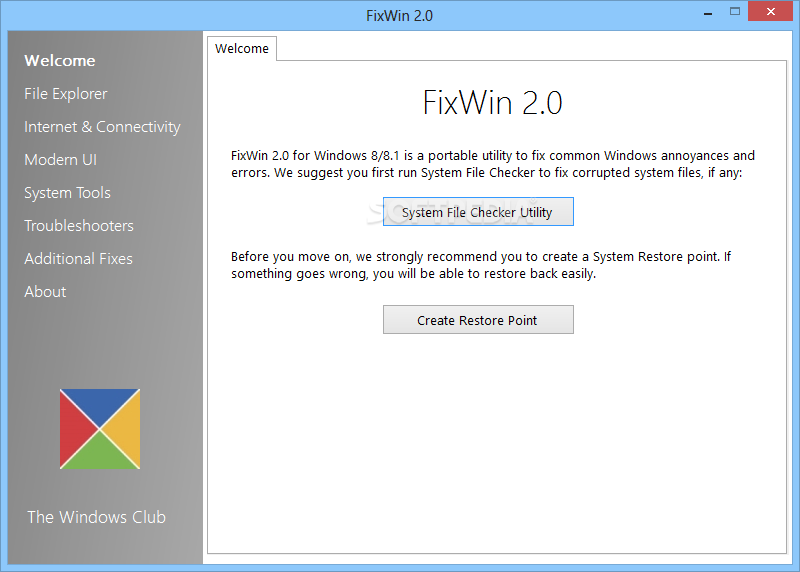
Repair & Fix Windows 7 & Vista problems with FixWin Utility

The current version of FixWin (v1.1) contains over 50 fixes for Windows explorer, Internet Explorer, Windows Media and System tools.


Key features of FixWin:

 Over 50 fixes for Windows

 Requires no installation

 Very easy-to-use

 One-click fix

This tool also enables you create a restore point before you actually making any changes your

system registry. FixWin is a portable utility, which requires no installation. The download size of

this tool is just 127 KB and can be downloaded from mediafire

Fix Common Windows 7 Errors With 7 Quick Fix


7 Quick Fix is a handy utility for Windows 7 users to fix Windows errors caused by viruses or other malicious things. Here are some of the key fixes available in 7 Quick Fix tool:

 Enable task manager

  Enable command prompt

 Enable registry editor

 Enable folder options

 Fix slow thumbnail

 Restore aero function

 Disable IPv6

 Enable IPv6

 Prevent Themes from making

 Fix missing system tray icons

 Enable disabled taskbar context

Fix Slow shutdown

 Reboot after update

 No DVD drive

Display properties

Enable disabled Control Panel

Download Link from Mediafire:http://www.mediafire.com/?nkzyzgmqdzj

Procedure to clearing the ConfigMgr (SCCM) client local cache (CCM cache) -Resolving Disk space isssue

Essentially the client cache is a temporary download location for software, applications and software updates that are deployed to a clie...